
I built a research knowledge library that brings that information together and makes it searchable across product areas, roles, and workflows.
The goal was simple: make it easier to use what we’d already learned before going out and researching the same thing again.
01 — The Problem
The problem wasn’t a lack of research
We had plenty of it. What we didn’t have was an easy way to find and reuse it.
If someone wanted to know what customers had said about payment plans, they might have to track down a product owner, find an old interview transcript, or ask around for a summary.
Even when research was available, it was often organized around the project or person who created it. That made sense when the research was conducted, but it wasn’t particularly useful to someone working on a related problem two years later.
I wanted anyone working on the product to be able to find relevant evidence without needing to know where it originated.
02 — Organizing
Organizing what we already knew
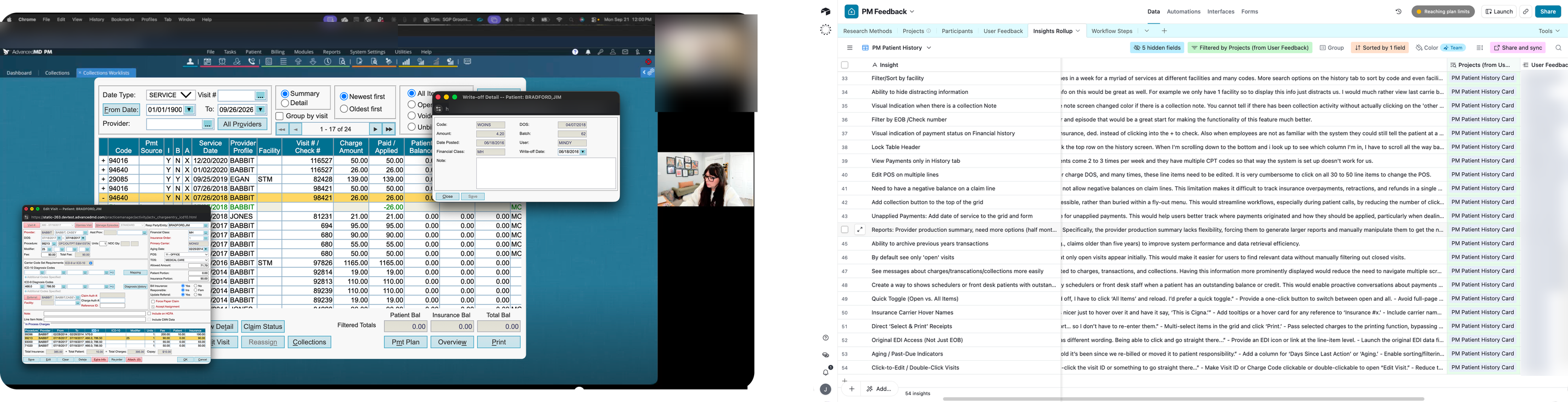
I brought together discovery transcripts, research findings, Pendo Voice of the Customer feedback, Aha! ideas, and product documentation.
But putting everything in one place wasn’t enough. A folder full of transcripts is still a folder full of transcripts.
The more important work was deciding how the information should be organized.
I structured the library around product areas, user roles, and workflows rather than individual research projects. Findings from different sources could then be retrieved together, even when they came from different teams or were collected years apart.
I used Claude to help synthesize and retrieve information across the library, with the original source material available to check the findings.
03 — Making It Useful
Making the information useful
The library lets us ask questions across the research we’ve already collected.
Instead of searching through individual transcripts, someone can ask what we’ve learned about a particular workflow and retrieve relevant findings, customer feedback, and related documentation.
This is particularly helpful when preparing for new research. We can see what customers have already told us, where findings overlap, and which questions still need answers.
Pendo Voice of the Customer feedback adds another source of customer-reported problems and requests to those findings.
I use Pendo behavioral analytics more selectively. During beta research, for example, I’ll compare previous and current behavior to understand how a redesigned experience is being used. I also use analytics when investigating a specific product area where usage data can help answer the research question.
Not every study needs behavioral analytics, and not every customer comment needs to be turned into a metric.
The point is to bring together the evidence that’s useful for the question we’re trying to answer.
04 — Service Maps
Connecting research across the product
The other important part of this work was building service maps.
AdvancedMD covers a large portion of a medical practice’s daily operations. Scheduling, check-in, clinical care, billing, payments, and collections are connected, even though they’re often researched and designed as separate product areas.
I mapped the patient journey into 14 stages, drawing on research from nine client practices to document pain points, desired outcomes, and opportunities across the platform.
The map gives us a way to look at the whole experience instead of just the feature we’re currently working on.
It also makes missing research visible. Two stages didn’t have enough supporting evidence, so I marked them as gaps rather than filling them with assumptions.
Those gaps help us decide where to focus future discovery.
05 — Beyond Features
Looking beyond individual features
Billing is a good example of why the broader view matters.
A problem might begin during charge entry, continue through claim scrubbing, and eventually create additional work in collections. Each team sees part of the problem, but the practice experiences the entire workflow.
The service map connects those findings so we can understand where the work breaks down and what customers actually need.
- Held claims need a manual touch even when the fix is fully predictable
- The rule builder can’t express compound conditions
- Credentialing exceptions only work payer by payer
- No bulk configuration or copying rules across states
- Errors are caught after charge entry instead of before
Compound rule logic, rules that correct and release claims automatically, bulk import, and validation at charge entry.
This has also been useful when exploring changes that cross Practice Management and EHR boundaries. Rather than relying on what one team knows about its part of the product, we can look at research collected across the larger workflow.
06 — Keeping It Current
Keeping it current
The library isn’t a one-time project.
As new discovery sessions happen and customer feedback comes in, I add that information to the existing knowledge base. Depending on the pace of research, updates happen weekly or monthly.
That way, new findings become part of the organization’s shared knowledge instead of another document someone has to remember exists.
The library now provides a common place to retrieve research across product areas, compare findings from different sources, and identify questions that still need investigation.
It doesn’t replace research or the judgment required to interpret it. It helps us make better use of the research we’ve already done.
07 — What Changed
What changed
We now have a shared, searchable research library rather than relying on individual people to remember where information lives.
Research from different teams and studies can be considered together. Customer feedback adds context to discovery findings. Service maps connect those findings across the broader product experience, including areas where our knowledge is incomplete.
The biggest change is how we can approach the next problem.
Instead of starting from scratch, we can start with what we already know, check the evidence, and spend our research time answering the questions that remain.
I’d build this again. Once the structure is established, maintaining it is relatively straightforward. And research becomes a lot more valuable when people can keep using it long after the original study is finished.